Blog
Warehouse Management Software UAE: 2026 Buying Guide
Octate Team
2026-11-03
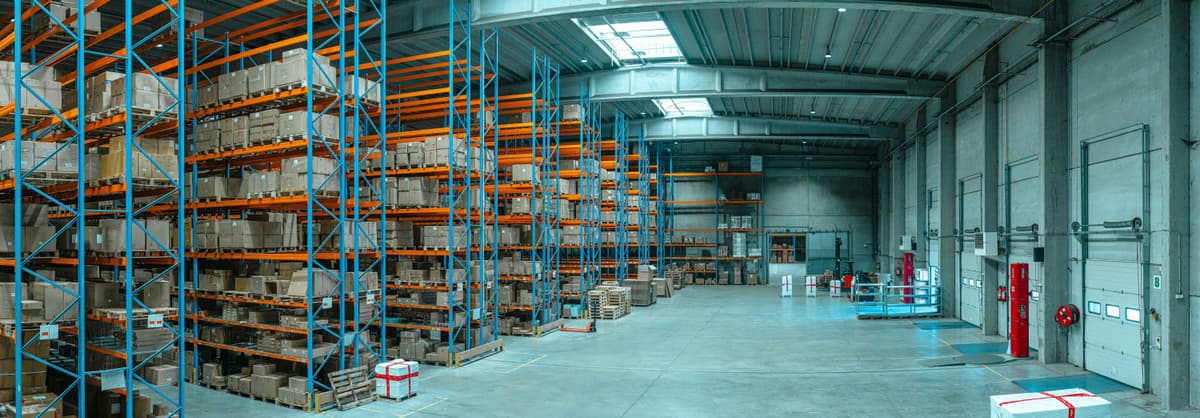
How to choose warehouse management software in the UAE: 12 features, a demo scorecard, VAT and free-zone stock rules, and what drives the cost.
Warehouse management software (WMS) tells your team where every item sits and directs the work of receiving, putaway, picking and counting. For a UAE business, choose one that tracks stock by warehouse, rack and bin, works with handheld barcode scanners, and records transfers between sites in Dubai, Abu Dhabi and Sharjah. It should also post every movement to inventory and the accounts, so stock figures, VAT invoices and the ledger agree.
How we wrote this guide. Octate sells cloud ERP with a warehouse module, so we keep our own product to one section near the end and describe it only with features listed on our warehouse management page. Tax and customs rules come from the Federal Tax Authority (FTA), the Ministry of Finance (MoF) and Dubai Customs, linked under Sources. Facts last verified: 2 November 2026.
Key points:
- A WMS tracks stock to the bin and directs warehouse work. Inventory software tracks quantities and value. An ERP ties both to purchasing, sales and accounting.
- In the UAE every order you ship to a customer leads to a tax invoice. E-invoicing becomes mandatory from 1 July 2027 for businesses under AED 50 million, so check how a shipment becomes an invoice.
- A free zone isn't automatically a designated zone for VAT. Check the official list before you rely on out-of-scope treatment.
- Test vendors with your own data: receive, put away, pick and transfer, then follow the money to the ledger.
What Is a Warehouse Management System?
A warehouse management system is software that records where each item is stored and directs the people who move it. It typically covers:
- Receiving: checking deliveries against the purchase order and holding goods for inspection.
- Putaway: choosing a rack and bin for each item and recording where it went.
- Picking and packing: building pick lists, guiding pickers to bins and printing labels.
- Transfers: moving stock between warehouses, stores or branches with a document trail.
- Counts: cycle counts and full stock takes that compare the system with the shelf.
- Traceability: batch numbers, serial numbers and expiry dates.
How a WMS Works: One Order from Receipt to Invoice
Here is one order moving through a WMS that sits inside an ERP. The company and figures are an example, not a customer.
A Dubai trading company orders 40 cartons of a cleaning product from its supplier.
- Receive. The cartons arrive at its Al Quoz warehouse. A storekeeper scans each carton against the purchase order, the system records a goods receipt for 40 cartons, and the purchase order shows as received.
- Inspect. Two cartons are damaged. They go to a quarantine bin, so only 38 become available to sell.
- Put away. The product sells every day, so the system suggests bin A-03-02, next to the packing area. The storekeeper scans the bin label to confirm.
- Pick. A customer in Abu Dhabi orders 12 cartons. The pick list sends the picker to A-03-02, and the scanner checks the item and quantity.
- Ship. A delivery note records 12 cartons leaving the warehouse. Stock in A-03-02 drops from 38 to 26.
- Invoice and post. The tax invoice comes from the same order, with VAT on each line, and the ledger records the sale, the VAT and the cost of the goods sold.
Every step leaves a dated record of who did what. Your auditor, your VAT return and your month-end stock valuation all rely on that trail.
WMS vs Inventory Management vs ERP
Inventory management software tracks how much stock you own and what it's worth, usually per warehouse. A WMS goes a level deeper: it tracks the rack and bin, and it directs receiving, picking and counting. An ERP connects both to purchasing, sales orders and accounting, so the pick that ships an order also updates the invoice and the ledger.
A business with one store room often needs only inventory management. Bin-level control pays off once you run several warehouses, hundreds of bin locations, or stock with batches and expiry dates.
Types of Warehouse Management Systems
- Standalone WMS: built for warehouse operations only. It can go deep on automation, but it connects to your accounting system or ERP through an integration. Every receipt, transfer and shipment has to sync, and someone has to fix it when the sync fails.
- WMS inside an ERP: shares one database with purchasing, sales and accounting. A goods receipt closes the purchase order and adds stock in one step.
- Supply chain suites: warehouse, transport and planning modules from one vendor, built for large distribution centres with conveyors or automated storage and retrieval.
- 3PL systems: built for logistics providers that store stock for several clients and bill each client for storage and handling.
- Cloud or on-premise: a cloud system runs in a browser for a subscription, and the vendor handles updates. An on-premise system runs on your own servers.
For most SMEs a WMS inside the ERP is simpler to run and to audit. One question settles most debates: which system will your finance team trust for stock valuation at month end? If the answer is the ERP, warehouse data has to reach it without anyone re-keying it.
Signs You Need a WMS
- Staff search for stock because nobody knows which shelf it's on.
- Stock counts don't match the books, and the gap shows up only at year end.
- Orders ship with the wrong item, batch or quantity.
- You run more than one warehouse, store or branch and move stock between them.
- Customers or inspectors ask you to trace a batch, serial number or expiry date.
- Receiving happens on paper, so purchase orders stay open after the goods arrive.
12 Features to Check
- Multi-warehouse control: every site in one system, with stock by warehouse, rack and bin from one login.
- Rack and bin locations: structured numbering for racks, aisles, shelves and bins, with capacity limits per bin.
- Barcode and QR scanning: handheld scanners for receiving, picking, transfers and counts.
- Receiving against purchase orders: a goods receipt updates the purchase order, with a quality-control hold before stock is available to sell.
- Putaway rules: fixed bins for each item, random putaway into any free bin, or fast movers placed nearest the packing area. Ask which of these the system supports.
- Picking strategies: wave, zone and batch picking, with first-in-first-out (FIFO) or first-expired-first-out (FEFO) for dated stock.
- Batch, serial and expiry tracking: traceability for food, pharmaceuticals, electronics and anything sold with a warranty.
- Transfers between sites: transfer documents that show stock leaving one warehouse and arriving at another.
- Cycle counts: counting a few bins every day instead of closing the warehouse for a full stock take.
- Returns and quarantine: damaged or returned goods held in separate bins until someone decides what to do with them.
- Roles and audit trail: access by role and by warehouse, with a log of who moved what and when.
- Reports: bin occupancy, slow-moving and near-expiry stock, and picking accuracy.
UAE-Specific Questions to Ask
VAT on Every Stock Document
Stock movements drive VAT documents: a delivery leads to a tax invoice, and a return leads to a credit note. Moving stock between two mainland warehouses of the same company is a transfer, not a sale, so it should create a transfer document, not a tax invoice. Check that the system applies the right VAT treatment on each line and that warehouse documents and invoices come from the same records, so your VAT return isn't rebuilt from spreadsheets.
E-Invoicing for the Invoices Your Warehouse Triggers
Under the UAE e-invoicing mandate, invoices between businesses become structured PINT AE e-invoices, exchanged over the Peppol network by Accredited Service Providers (ASPs). For businesses with revenue under AED 50 million, e-invoicing becomes mandatory from 1 July 2027; larger businesses start earlier. If your WMS ships orders, ask how a shipment becomes an e-invoice: in the same system, or by export to another one. Our UAE e-invoicing guide for SMEs covers the dates and steps.
Arabic and English Documents
Ask whether pick lists, delivery notes and invoices print in Arabic and English, and whether item names can be stored in both. Warehouse staff and customers may need different languages on the same document.
Several Sites Across the Emirates
If you have a warehouse in Dubai, a store in Abu Dhabi and a unit in Sharjah, check that each site has its own locations but shares one item list, and that a transfer between emirates is recorded when it leaves one site and when it arrives at the other. Ask whether staff can scan on a handheld at every site, and what happens when a site loses its internet connection.
Mainland and Free-Zone Companies
Many UAE groups run a mainland company and a free-zone company side by side. Each company needs its own stock, books and VAT settings, and the owners need consolidated reports. Ask whether one login covers both, and how stock moving from one company to the other is recorded in each company's books.
Free-Zone Warehouses: JAFZA, KIZAD and DMCC
Many UAE warehouses sit in free zones such as JAFZA, KIZAD or DMCC. For tax, a free zone isn't automatically a designated zone: the FTA says businesses must check, for each tax law separately, whether their area qualifies, and the designated zones for VAT are the ones listed in Cabinet Decision No. 59 of 2017 and its amendments.
Where a warehouse is in a designated zone, the FTA's VAT guide treats goods moved between two designated zones as outside the scope of VAT, as long as they aren't released, used or altered on the way and the move follows GCC customs suspension rules. Goods moved from a designated zone to the mainland are treated as an import. The FTA describes this treatment as subject to strict criteria and detailed record keeping. Separately, Dubai Customs requires free-zone companies with a customs business code to use an inventory system that meets its requirements.
E-invoicing adds a field. The MoF's Guidelines list free-zone supplies as a scenario with extra requirements. Where the customer is a free-zone entity, the e-invoice also records the beneficiary: the person who ultimately uses or owns what is supplied. In most business sales, that's the same company as the customer.
What that means for your WMS:
- Every movement into, out of and between zones needs a document with the date, quantities and the companies involved.
- Stock owned by a free-zone company and stock owned by a mainland company must stay apart in the books, even in the same building.
- Your customs broker and auditor will ask for these records, so look at the vendor's movement reports before you sign.
Ask each vendor to show a transfer from a free-zone company to a mainland company, and the records that transfer leaves behind.
How to Run a WMS Selection
- Map your process. Walk the warehouse and write down how goods arrive, where they go, how orders are picked and how stock leaves. Note every paper form and spreadsheet.
- Count what you manage. Warehouses, racks, bins, SKUs, daily orders and users. Vendors size and price on these.
- List your must-haves. For example batch or expiry tracking, several companies, Arabic documents, scanners and e-invoicing. Keep the list short.
- Shortlist three vendors. If your finance team works in a separate system today, include at least one WMS that sits inside an ERP.
- Demo with your own data. Run the scorecard below on each vendor, with a scanner, while you watch.
- Follow the money. After the demo, ask to see the stock valuation, the journal entries and the VAT on the invoice that the pick created.
- Plan go-live. Label racks and bins, count opening stock, train pickers first, and switch over in a quiet week.
A Demo Scorecard You Can Copy
Score each test 0 (fails), 1 (works with a workaround) or 2 (works as shown). Run every test on a handheld scanner, with your own items.
- Receive a real purchase order with one line short and one carton damaged.
- Put the goods away and show which bin the system suggested.
- Pick an order with two items from different aisles.
- Pick a batch-tracked item and show which batch was chosen, and why.
- Transfer stock to another warehouse, and show it in transit and on arrival.
- Count three bins and post the difference.
- Move a returned item to a quarantine bin.
- Show the tax invoice and journal entries that the shipped order created.
- Find who moved a given carton last week, using the audit trail.
- Run the near-expiry and slow-moving stock reports.
Compare the totals, but read the zeros first. A 0 on a task your team does fifty times a day matters more than a high total.
What Drives the Cost
- Subscriptions or licences: per user or per site, monthly or yearly.
- Hardware: handheld scanners, label printers and rack labels.
- Implementation: setting up locations, importing items and opening stock, and training.
- Integrations: connecting a standalone WMS to your accounting system or ERP, and keeping that link working.
Ask every vendor for a written quote that covers all four, then compare quotes over three years, not one. Implementation is paid once, but subscriptions and integration upkeep repeat every year.
Where Octate Fits
Octate is cloud ERP with warehouse management built in, hosted on AWS. Every plan includes multi-warehouse management. Each warehouse gets its own racks and bins, staff scan barcodes or QR codes with handheld scanners to receive, pick and transfer stock, and stock moves between sites with transfer documents. Octate tracks batch and serial numbers and flags slow-moving or near-expiry stock.
Goods received against a purchase order post to inventory and the ledger, and picked orders flow from order management, so there is no second system to sync. Business+ covers up to 5 companies under one login, each with its own stock, books and VAT settings, with separate or consolidated reports.
Pricing is published: Professional is $49.99 and Business+ is $79.99 per seat per month, billed in USD. For example, 10 users on Professional cost $499.90 a month, or $5,998.80 a year, before scanners and printers. Every plan starts with a free 30-day trial with no credit card. See pricing, or read how Octate fits as ERP software in the UAE.
Quick Answers
What is a warehouse management system? Software that records where each item is stored, down to the rack and bin, and directs receiving, putaway, picking, transfers and counts.
How does a WMS work? Staff scan items as they're received, put away, picked and shipped. Each scan updates the stock in that bin and leaves a dated record. In an ERP, the shipment also creates the invoice and the ledger entries.
What are the types of warehouse management systems? Standalone WMS, WMS modules inside an ERP, supply chain suites for large distribution centres, and 3PL systems for logistics providers. Each can run in the cloud or on your own servers.
What is the difference between ERP and WMS? A WMS runs the warehouse floor. An ERP runs the whole business, including accounting, purchasing and sales, and may include a WMS module.
What is the difference between a WMS and inventory management software? Inventory software tracks quantities and value per warehouse. A WMS also tracks the rack and bin, and it directs receiving, picking and counting.
Do I need a WMS for one warehouse? Not always. If one warehouse has many bins, batches or daily orders, bin-level tracking still cuts the time spent searching for stock.
Can one system manage warehouses in Dubai, Abu Dhabi and Sharjah? Yes, if it supports multiple warehouses with transfer documents between them. Check that every site's stock is visible from one login.
Do free-zone warehouses need special records? Yes. Moves into, out of and between designated zones need documents with dates, quantities and the companies involved, and Dubai Customs requires an inventory system for free-zone companies with a customs business code.
What does warehouse management software cost in the UAE? It depends on users, sites, hardware and implementation. Cloud systems usually charge per user per month, and scanners and label printers cost extra.
Sources
- Federal Tax Authority: Designated Zones VAT Guide, VATGDZ1 (July 2018), Public Clarification VATP027 on goods and services supplied in a designated zone (March 2022) and Public Clarification TAXP010 on free zones and designated zones (October 2026)
- Dubai Customs: Announcements, inventory systems for free-zone companies
- Ministry of Finance: eInvoicing and UAE Electronic Invoicing Guidelines, version 2.0 (26 October 2026), section 10.4 on free-zone scenarios
- Octate: warehouse management and pricing
Checked on 2 November 2026.
